From a heritage image to a new design: what changes, and what remains?
A mosaic brings together small pieces to create a larger picture. Its character comes from more than the subject it depicts: the arrangement of shapes, the rhythm of its borders, its colours and the texture of its surface all contribute to how we experience it.
What happens when that image becomes the starting point for something new?
The REEVALUATE AI Creative Reuse Enabler tutorial explores this question through a simple example. A user selects an image of a heritage mosaic and asks for a new mosaic featuring a bird. The resulting design offers an opportunity to look closely at creative reuse: which visual qualities remain recognisable, which elements change, and where the user’s choices enter the process.
The starting point: looking beyond the subject
The selected artefact in the demonstration is titled “Polychrome mosaic with fawn and dog”. Its animal scene sits within a structured geometric border, giving the image both a central subject and a distinctive surrounding pattern.
For a creative user, these elements offer different starting points. The animals might inspire a new theme. The border might suggest a decorative arrangement. The mosaic surface itself might become the defining feature of a new composition.
Choosing a reference image therefore involves more than finding an attractive object. It means considering what, specifically, makes that image useful for the intended design.
A short prompt makes a creative choice
In the tutorial, the user enters:
“Create a vibrant mosaic with a bird in a similar style.”
This short instruction combines continuity with change. It keeps the mosaic as a visual reference, introduces a different animal and asks for a more vibrant treatment.
The wording leaves other decisions open. It does not specify the bird’s species, its pose, the exact colours or the arrangement of the background. Those details become part of the generated interpretation.
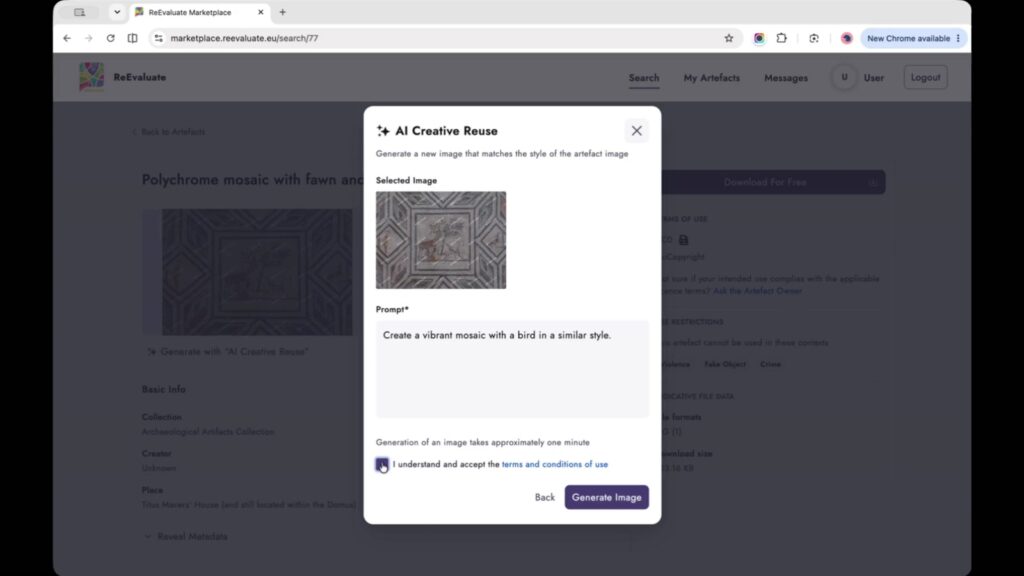
Figure 1. Setting the creative direction: the selected heritage image and the prompt used in the AI Creative Reuse demonstration. Source: REEVALUATE AI Creative Reuse Enabler tutorial.
Reading the result
The generated image presents a large bird with prominent turquoise colouring against a textured mosaic background. The small, tile-like pieces remain central to its appearance, while the composition differs visibly from the selected source.
The bird becomes the dominant subject. The original geometric framing no longer organises the picture in the same way, and the stronger colour accents give the output a different visual emphasis.
This comparison makes the meaning of “similar style” worth examining. Similarity can appear through texture or technique without preserving the original layout, palette or subject. A generated image can evoke a mosaic while introducing a substantially different design.
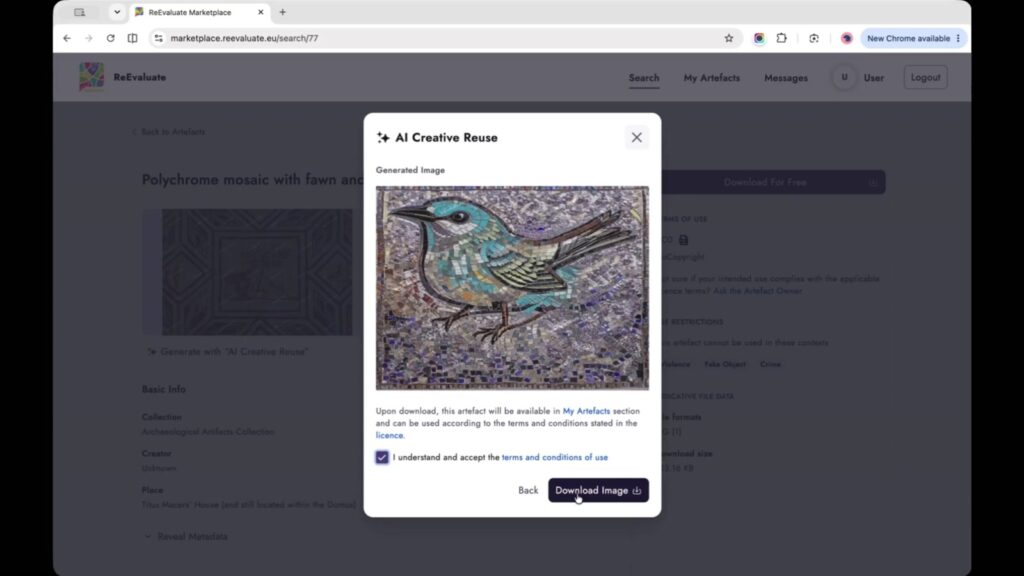
Figure 2. A new visual interpretation: the bird mosaic produced during the demonstration. This is an AI-generated design, not an image of the original historical artefact. Source: REEVALUATE AI Creative Reuse Enabler tutorial.
Where the designer’s judgement matters
Receiving an image is one stage of the creative process. Deciding whether it serves the intended purpose requires another kind of work.
Three questions can help guide that review:
What connection to the source is still visible? Look for specific features, such as the tiled surface, repeated shapes or colour relationships.
What has changed more than expected? Consider whether a border, proportion or compositional detail was important to the original intention.
What would you ask for differently next time? A more precise instruction could request a restrained palette, a clearer border or a different balance between subject and background.
These are suggestions for examining an output, rather than additional steps demonstrated in the video. They show how a simple example can support a more deliberate approach to creative experimentation.
Giving the new image its own context
The resulting bird design should be understood as a contemporary generated interpretation. Keeping the source reference and the creative instruction alongside it helps explain how it came about without confusing it with the heritage object.
That relationship is what makes this example interesting: a historical image becomes a reference for a new visual idea, while comparison keeps the differences visible.
Watch the AI Creative Reuse Enabler tutorial, or explore the other demonstrations on the REEVALUATE tutorials page.
REEVALUATE has received funding from the European Union’s Horizon Europe Research and Innovation Programme under Grant Agreement No. 101132389.